
Guide 5 of 9
What readers see on their phone
This is what your audience sees after they scan the QR code and press Follow. It helps to know it, so you can explain it in one sentence.
-
1Each line, a moment after it is said
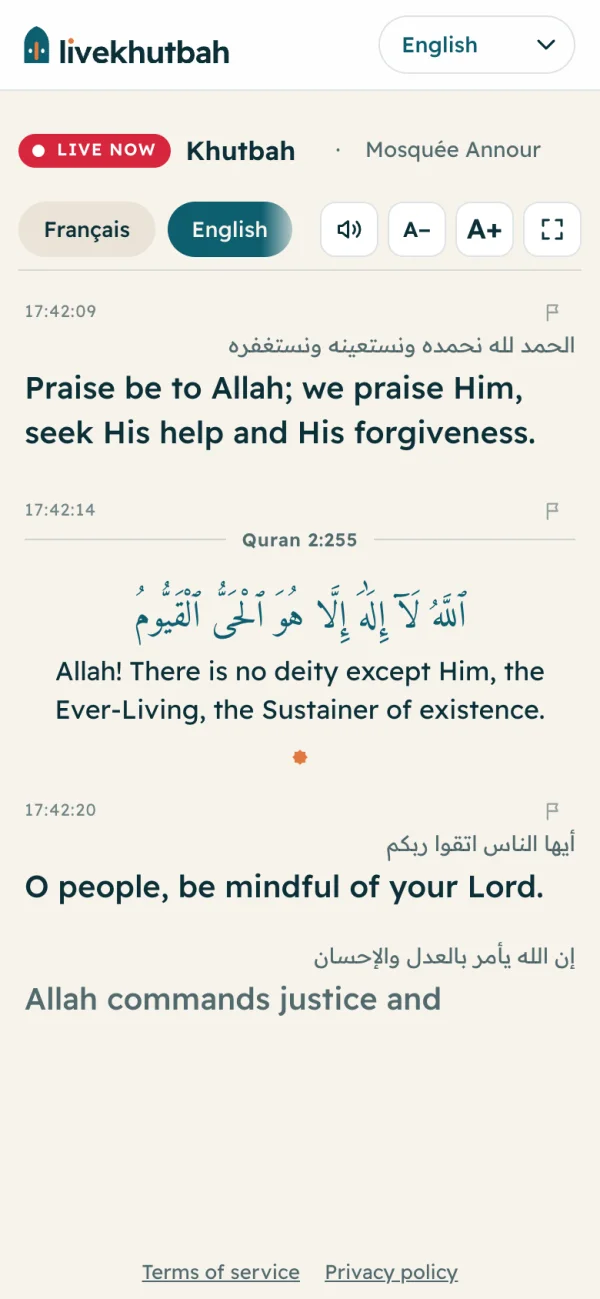
Each sentence appears a moment after the speaker says it, with its time. The newest line is at the bottom and the page follows it.
By default, readers see only the translation. To show the speaker's own words above it too (like in this picture), open Settings and turn on Show what the speaker says above the translation. Quran verses always keep their Arabic.
-
2The buttons at the top
Language buttons: each reader taps their language. Transcription shows the speaker's own words.
A− and A+: smaller or bigger text.
The square: full screen, good for a tablet or a laptop on a screen.
The speaker: listen to each line read aloud, with earphones. It shows only if you turned on Read aloud on phones when you went live.
-
3Quran verses
When the speaker recites a verse, it is not machine-translated. Readers see the Arabic verse, an official translation (from QuranEnc.com or Quran.com), the surah and the verse number.
-
4Report a wrong line
Each line has a small flag. A reader can tap it and tell us what is wrong (a wrong word, or a missing translation). We read every report.
Questions
Can readers change language during the session?
Yes. They tap another language at the top and every line already shown changes too.
Can readers read it again after the session?
Yes, if you make the session public. See Past sessions.
Do readers pay anything?
No. Reading is free for them. If you are a mosque or a non-profit, they can also choose to support you from your public page.